
An invitation or email has not arrived
Check the address, sending status and link validity before requesting another message.
- Relevant invitation
- Sending status
Before you start
Know what you expected: account activation, a survey invitation, a welcome email or password recovery.
- Identify the message type and who was supposed to send it.
- Have the intended recipient address and approximate sending time ready.
Step by step
Check the recipient address
Confirm the exact destination with the authorised sender. A director contact address and an account sign-in address may be different.
- Ask the authorised sender to read the destination from the relevant record. Check for spelling mistakes and whether the account and contact addresses differ.
Check your inbox folders
Look in junk, spam and any organisation quarantine. Search for Elencra and the expected organisation or subject.
- Check spam, junk and organisation quarantine as well as the normal inbox. If your organisation filters email centrally, its IT team may need to help.
Ask the sender to review status
The sender should check the relevant invitation register or email history. A prepared draft, preview or copied link does not mean an email was sent.
- For surveys, read the Email column in Survey invitations separately from Participation. “Not sent” is different from a link being available; service acceptance is not delivery confirmation.
Check actual invitation statusExample workspaceEnlarge screenshot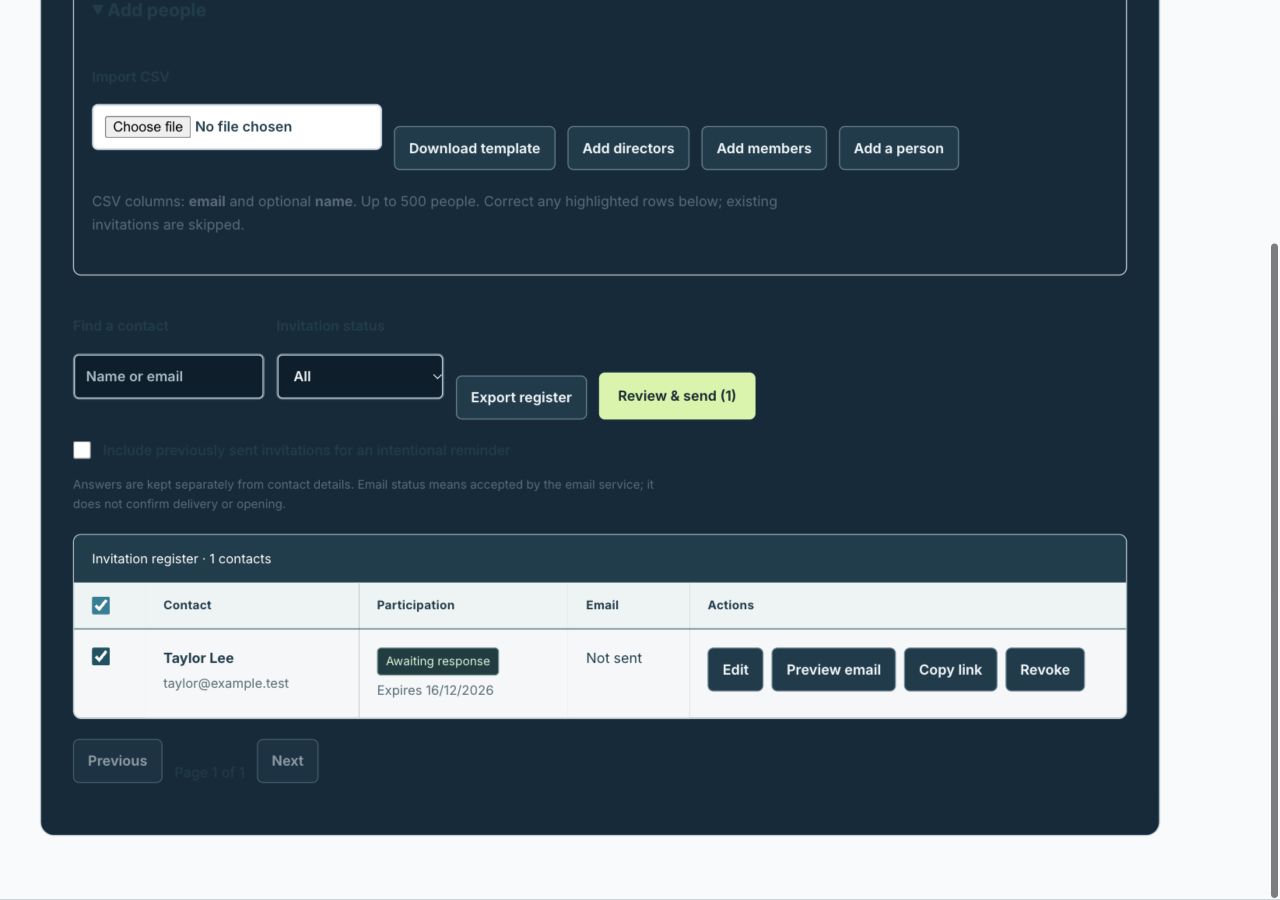
For survey emails, inspect the Email column and Preview email. A created invitation is not proof of delivery.
Actual app interface with fictional records. Your permissions and screen size may change the options shown.
Use the latest valid link
A renewed invitation or edited survey contact can invalidate earlier links. Use the most recent confirmed invitation intended for you.
- If an address or invitation was replaced, use the latest message intended for you. Do not share a private link with support to demonstrate that it failed.
Retry deliberately
If sending failed or is uncertain, use the available retry or renewal flow after checking status. Avoid repeated new sends while one request is pending.
- Review the current result before retrying. Avoid repeated sends to the whole audience when only one person needs a corrected or renewed invitation.
For example
A survey contact’s email was corrected after the first invitation. The old private link stops working; use the replacement invitation rather than trying the first email again.
What you should see
You know whether to wait for delivery, correct the address, renew a link or ask support to investigate.
- The intended address and actual send status have been checked.
- You are using the newest valid link intended for you.
If something looks different
Never paste a private participation or recovery link into a support message. Include the message type, approximate time and safe error text instead.
A common question
The sender says the service accepted it. Why is it missing?
Acceptance confirms that the email service accepted the sending request. The recipient mailbox may still delay, filter or quarantine it. Check those folders and ask the sender to review any available failure information.
Did this help you move forward?
Your response stays in this browser on this device.
Updated 16 November 2026. Your organisation’s permissions and settings can change the options you see.