
Record a risk and its treatment
Keep the risk, responsibility, treatment and board review connected.
- Risks
- Create a record
Before you start
Use your organisation’s risk approach and terminology. Software ratings support discussion; they do not replace judgement.
- Know the organisation’s rating criteria and the relevant review facts.
- Have the current controls, treatment progress and next review date ready.
Step by step
Find or create the risk
Open Risks. Search existing records first, then use Add risk if this is new.
- Search the register before using Add risk. Register view can help you find a named record; the matrix is useful for inspecting the risks in a scoring cell.
Choose the useful risk viewExample workspaceEnlarge screenshot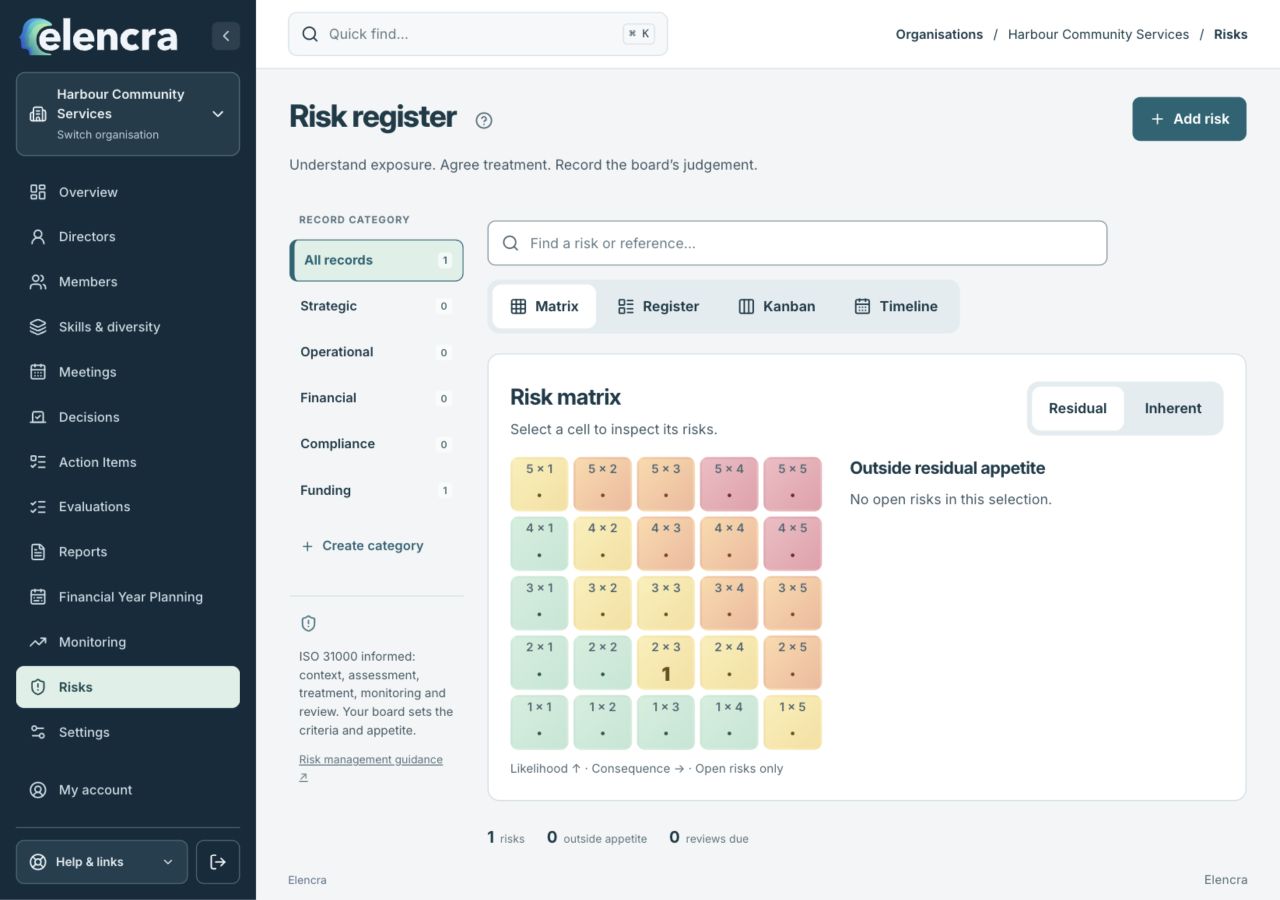
Use Register view to find named records, or inspect residual exposure in the matrix.
Actual app interface with fictional records. Your permissions and screen size may change the options shown.
Describe the risk
Record what could happen, its context, owner and next review. Choose the correct category and status.
- Describe the event, cause and consequence clearly. A short title should help readers recognise the exposure without replacing its fuller explanation.
Assess consistently
Complete likelihood and consequence using the organisation’s approach. Review residual exposure separately where shown.
- Keep inherent exposure distinct from residual exposure after controls. Use the same rating criteria throughout, and check appetite separately from the numerical score.
Record the treatment
Add treatment actions, responsibility and evidence of progress. Link connected monitoring records or supporting documents where relevant.
- Record what treatment will be done, who is responsible and when it is due. A planned control should not be described as operating effectively without evidence.
Save the review trail
Save changes. When recording a board review, link the relevant decision or minutes information and explain what the review concluded.
- Explain what changed and the basis for the board’s judgement. Connect the relevant decision or minutes when recording a board review rather than treating an edit as a formal decision.
For example
A grant-dependency risk can link to the program’s monitoring record. Record the mitigation work and review date rather than lowering the rating simply because a treatment was proposed.
What you should see
The risk has an accountable owner, a visible response and a review history.
- The rating and status are supported by current information.
- Treatment responsibility and the next review are clear.
If something looks different
Legacy categories may need an explicit Resolve category choice. Preserve useful history and seek the organisation’s guidance rather than guessing a new rating.
A common question
Should I lower a rating when a treatment is proposed?
Not just because it is proposed. Review the residual exposure using evidence about controls and treatment that actually exist. Record planned work and revisit the assessment as that work progresses.
Did this help you move forward?
Your response stays in this browser on this device.
Updated 16 November 2026. Your organisation’s permissions and settings can change the options you see.