
Prepare a director’s welcome and induction
Personalise the welcome, check the resources and keep onboarding progress distinct from email delivery.
- Directors
- Open profile
- Onboarding and induction
Before you start
Save the director’s correct email address and review the organisation’s resource links and governance contact.
- Check the director’s recipient address and preferred name.
- Have current resources and the appropriate governance contact ready.
Step by step
Open induction
Open the director profile and select Onboarding and induction.
- Choose Onboarding and induction on the saved director profile. Check the person’s name in the page heading before preparing a personalised welcome.
Open the director’s inductionExample workspaceEnlarge screenshot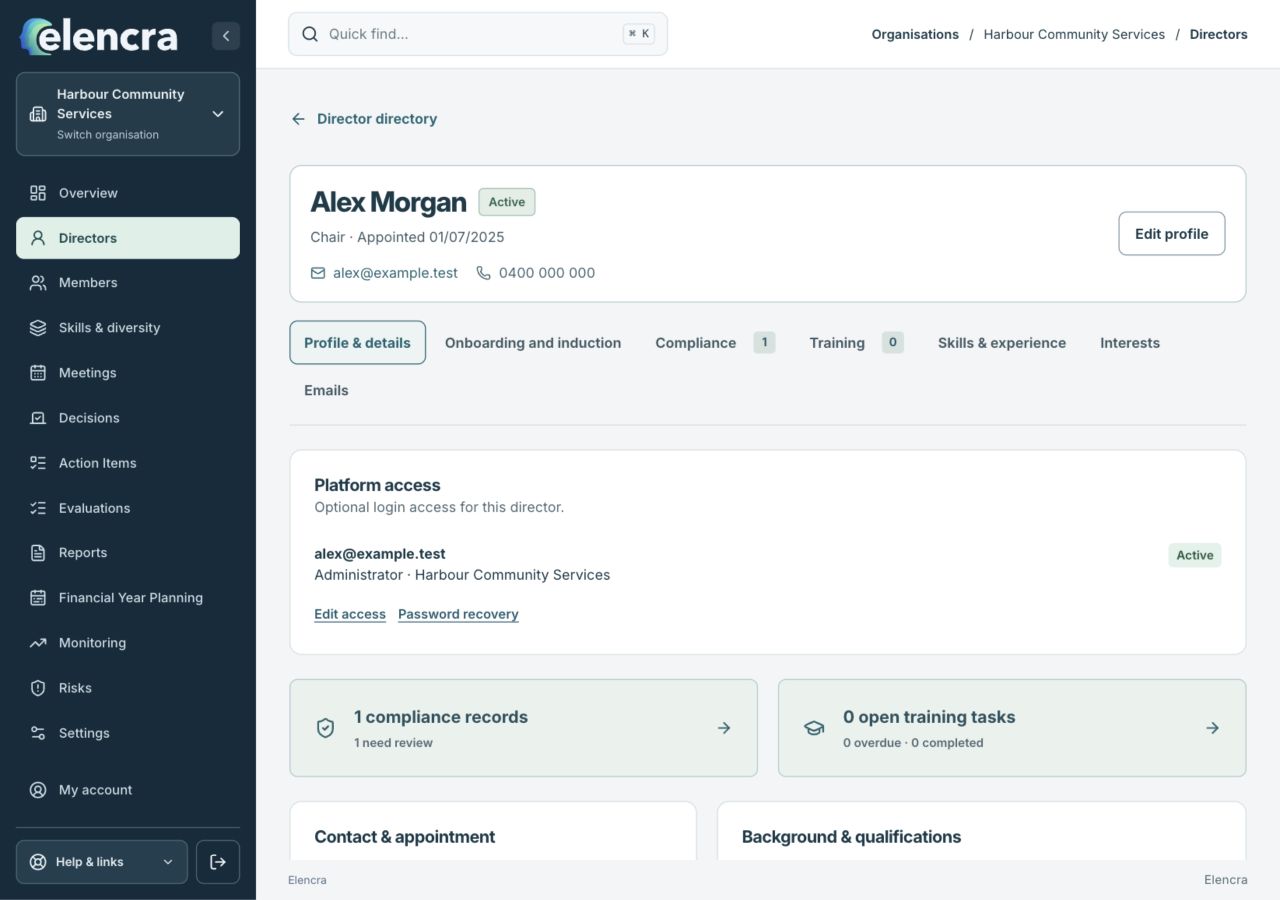
Choose Onboarding and induction for the saved director. This is separate from the Platform access panel.
Actual app interface with fictional records. Your permissions and screen size may change the options shown.
Prepare the welcome
Use the organisation welcome template or personalise Welcome message, subject and closing details. Check the governance contact review if requested.
- Replace template placeholders and read the whole message. Explain the immediate next step, who can help and any deadline in everyday language.
Choose useful links
Review the resource links and invitation deadline. A link should point to the resource the director is actually meant to use.
- Open the resource addresses yourself where you have permission. Use current plans and policies; avoid a link tied to another person’s private invitation.
Save and preview
Choose Save draft, then Preview welcome email. Confirm the recipient, wording and links before using the explicit sending action.
- Read the preview as the director will see it. Save the draft first, then use the explicit send control only when the recipient and content are correct.
Follow the onboarding record
Use the induction checklist and linked compliance or training records to follow progress. A sent email is not confirmation that documents were read or training completed.
- Use the checklist to follow actual progress. Record completed tasks when supported by the relevant record; an email accepted for sending is not evidence of induction completion.
For example
Welcome a new director with the current strategic plan and the right board contact. Do not reuse an old director’s personalised greeting or assume an outdated resource link still works.
What you should see
The welcome draft or sent-history entry records what was prepared or accepted for sending, with onboarding progress tracked separately.
- The welcome names the right person and includes current resources.
- The induction record distinguishes pending and completed work.
If something looks different
If sending is unavailable, save the welcome draft. If a previous request needs attention, check its delivery status before retrying rather than creating duplicate sends.
A common question
Does the welcome email automatically give platform access?
Treat the welcome and platform access as separate tasks. Check the director profile’s Platform access section and invitation state rather than assuming a welcome message creates a sign-in account.
Did this help you move forward?
Your response stays in this browser on this device.
Updated 16 November 2026. Your organisation’s permissions and settings can change the options you see.