
Read evaluation results in context
Review participation and reporting limits before drawing conclusions from responses.
- Evaluations
- Open evaluation
- Results
Before you start
Select the correct evaluation and reporting period. Results access depends on the evaluation and your permissions.
- Check the evaluation name, type and reporting period.
- Be ready to read any privacy or minimum-response notice alongside the results.
Step by step
Find the evaluation
In Evaluations, use the evaluation name, type or financial-year filters and choose Open.
- Use search or filters to locate the correct evaluation, then choose Open in its row. A similarly named review from another period can have different participants and questions.
Open the correct reviewExample workspaceEnlarge screenshot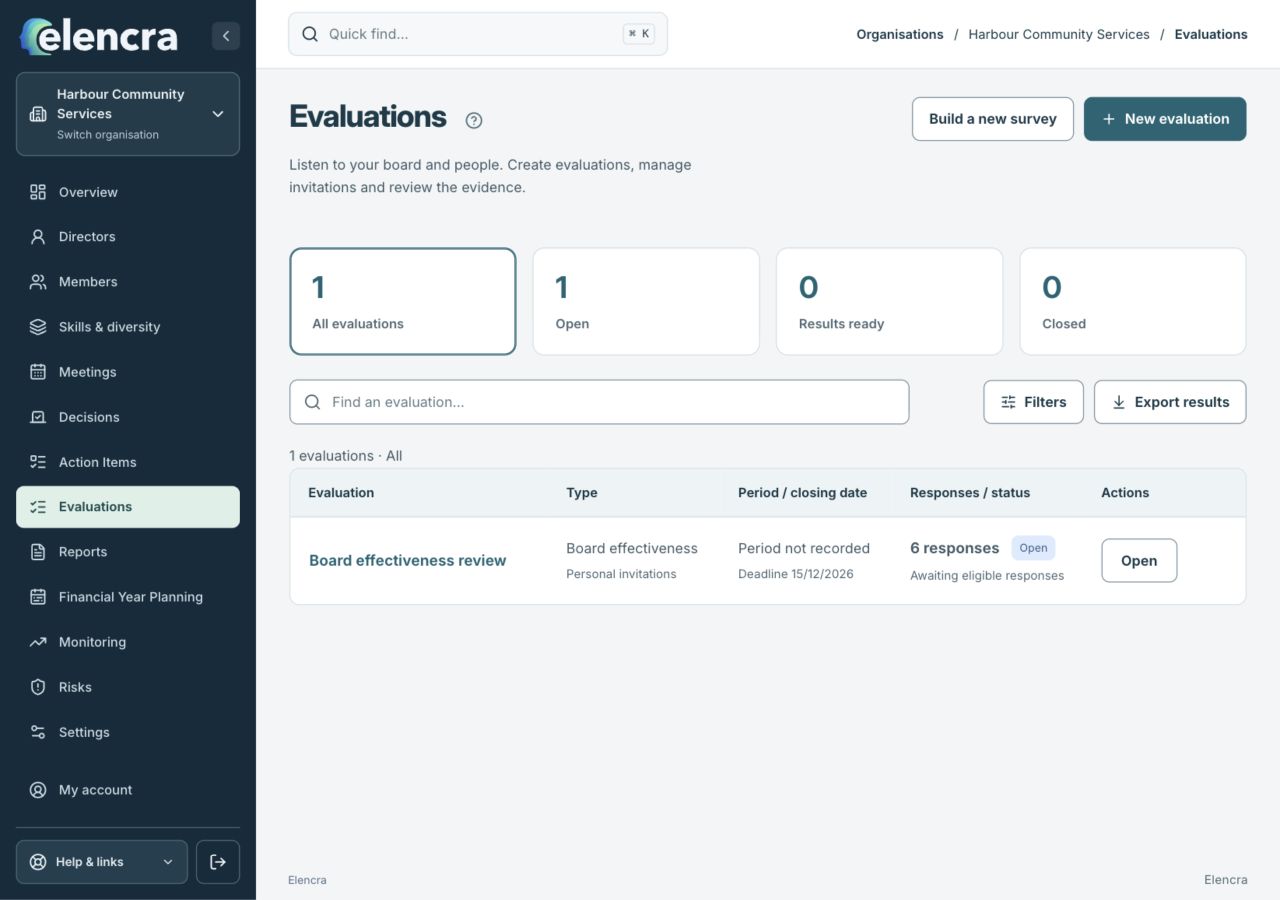
Search by evaluation name or period, then use Open. Read any reporting and privacy limits inside the selected review.
Actual app interface with fictional records. Your permissions and screen size may change the options shown.
Check participation
Review the recorded responses and any completion or reporting limitations before reading individual measures.
- Read the response count and limitations first. A large invitation list does not mean that everyone answered or that every question has enough applicable answers.
Read the question detail
Distinguish Answered, Skipped / hidden and Not applicable. These are different states and should not be combined as negative responses.
- Compare like with like. An answer, a skipped or hidden question, and Not applicable represent different situations; read the question-level labels before interpreting a score.
Respect withheld detail
Where a summary says detail is withheld for fewer than five applicable answers, use the available aggregate information rather than trying to identify respondents.
- Respect withheld detail. Do not work backwards from comments, small groups or a named attendance list to try to identify individual respondents.
Turn findings into follow-up
Record an agreed improvement or prepare an authorised report with the context needed for the board discussion.
- Bring the finding, its limitations and an achievable next step to the discussion. Keep follow-up actions separate from raw responses and private individual material.
For example
A low response count may mean the board needs more participation before interpreting a theme. An unanswered question is not automatically disagreement.
What you should see
You can explain what the results show, who they represent and the limits on interpretation.
- Your interpretation uses the actual response and applicability information.
- Any report or follow-up preserves the evaluation’s privacy limits.
If something looks different
Some evaluation types use different scoring models. Do not compare a question-level summary with an overall index as if they used the same scale.
A common question
Why is a response count visible but question detail withheld?
Reporting limits can depend on applicable answers to a particular question, not only the total survey responses. Read the notice shown for that measure and avoid interpreting withheld detail as a score of zero.
Did this help you move forward?
Your response stays in this browser on this device.
Updated 16 November 2026. Your organisation’s permissions and settings can change the options you see.